
Software Development
Full applications that solve a real problem — web, mobile, desktop or systems.
1–2 students
7–18 years old
Develop a sophisticated software application (mobile app, desktop program, web app, game, etc.) using any programming language(s) such as Python, JavaScript, Kotlin, Swift, Java, PHP, C#, etc. Students are encouraged to use originality and creativity to address a real-world problem. Projects should demonstrate strong technical proficiency, be user-friendly, and provide significant value.
Students may use AI tools in the development process, but they must cite all prompts, models, or AI resources used and give proper credit in their documentation and presentation.
This category is exclusively open to secondary school and high school students.
Inspiration
Sample Project Ideas
High school level. Use these as a starting point — the jury rewards original takes, not copies.
Mental Health Companion App
Mood tracking, CBT-style exercises, crisis resources, and AI-assisted journaling with clear citations.
Smart Study Planner
Web or mobile app that generates schedules from course syllabi, detects deadlines from PDFs, and sends reminders.
Campus Navigator
Indoor maps of school buildings with searchable rooms, clubs, events, and accessibility info.
EcoTrack
Personal carbon footprint calculator that suggests greener alternatives and local recycling points.
Community Service Finder
Matches students to nearby volunteering opportunities; includes hours tracking and supervisor sign-off.
Assistive Reading Tool
Web app that simplifies text, offers read-aloud, dyslexia-friendly fonts, and a bilingual glossary.
STEM Lab Manager
Inventory system for lab equipment and chemicals with safety datasheets and checkout/return workflow.
AI-Powered Flashcards
Generates flashcards from class notes or slides; spaced-repetition and quiz modes with explanations.
School Lunch & Nutrition App
Weekly menus, nutrition breakdowns, allergy alerts, and feedback to cafeteria staff.
Local Transit Buddy
Trip planning for buses/trams, live arrival estimates, and safe walking routes for the first/last mile.
Habit Builder for Teens
Daily habits (exercise, prayer/meditation, reading), streaks, and peer accountability groups.
Emergency Response Dashboard
Classroom check-in tool for drills, safe location sharing, and offline-first operation.
Waste-Sorting Game
Educational game teaching recycling rules with levels, challenges, and local regulation info.
Career Explorer
Matches interests to careers, shows required skills and courses, and simulates job tasks via mini-games.
Event Ticketing for School
Create/manage tickets for plays or sports events, QR code entry, and sales analytics.
Language Exchange Platform
Pairs students for conversation practice with AI-generated prompts and progress tracking.
Accessibility Mapper
Crowdsourced ratings of public places near school (ramps, elevators, signage, restrooms).
Cybersecurity Trainer
Interactive lessons on phishing, passwords, and privacy, with simulated email challenges.
Personal Finance Coach
Budgeting, savings goals, and "what-if" scenarios; connects concepts to real teen expenses.
School Garden IoT Dashboard
Sensor readings (soil moisture, temp), irrigation control, and growth logs.
Watch
Projects From Past Seasons
Real Software Development entries from past Infomatrix finalists.
Judging Criteria
Software Development Rubric
Each criterion is scored on a scale of 1 to 5 by the international jury.
- 1 · Needs work
- 2 · Limited
- 3 · Adequate
- 4 · Strong
- 5 · Exceptional
| Criteria | 1 Point | 2 Points | 3 Points | 4 Points | 5 Points |
|---|---|---|---|---|---|
| 01. Originality / Creativity | The project lacks originality and creativity, relying heavily on existing solutions. | Limited creativity with minimal innovative elements. | Some creative features, but the overall project lacks uniqueness. | Demonstrates creativity with a few original elements. | Exceptional originality and creativity are evident throughout the project. |
| 02. Practicality | The solution is impractical and lacks real-world application. | Limited practicality; the solution has minimal usefulness. | The project is somewhat practical but may have some usability issues. | Practical with a good balance of usability and functionality. | Highly practical, demonstrating a clear understanding of user needs. |
| 03. UI / UX | The user interface is confusing, and the user experience is severely compromised. | UI/UX needs improvement; navigation is not intuitive. | Acceptable UI/UX, but some aspects could be more user-friendly. | Well-designed UI/UX with good user interaction principles. | Exceptional UI/UX, creating a seamless and enjoyable user |
| 04. Functionality | The program lacks essential functionality and has numerous bugs. | Limited functionality with significant bugs or errors. | Basic functionality is present, but there are noticeable issues. | Good functionality with minor bugs that do not hinder performance. | The project demonstrates flawless functionality with no observable issues. |
| 05. Technical Skills | Little evidence of technical skills; the project seems beyond the student's abilities. | Basic technical skills demonstrated; significant room for improvement. | Competent technical skills; meets the expected standard. | Strong technical skills displayed with advanced techniques. | Exceptional technical skills; the student demonstrates mastery of programming concepts. |
| 06. Oral Presentation | Incoherent presentation; lacks structure and clarity. | Presentation is somewhat disorganized and difficult to follow. | Adequate presentation with clear communication but may lack enthusiasm. | Engaging and well-structured presentation; effectively conveys key points. | Exceptional oral presentation with enthusiasm, clarity, and strong engagement. |
| 07. Documentation | Little to no documentation provided; lacks necessary details. | Minimal documentation; insufficient details to understand the project. | Adequate documentation with some room for improvement. | Comprehensive documentation that effectively explains the project. | Exceptional documentation, providing thorough and clear insights into the project. |
| 08. The Stand Design | The stand lacks visual appeal and fails to showcase the project effectively. | Limited effort in stand design; does not attract attention. | Adequate stand design with some elements that showcase the project. | Well-designed stand that effectively highlights the project's key features. | Exceptional stand design, visually appealing, and enhances the overall presentation. |
| 09. Responsible AI Usage | AI use (if any) is opaque or improper (no credits; licensing/privacy ignored). | Minimal citation; limited oversight; unclear value added by AI. | Cited tools/models and prompts; human review present; generally appropriate. | Transparent, well-justified AI use with editing/validation and compliance. | Exemplary: ethical, transparent AI integration that elevates the product with reproducible process. |
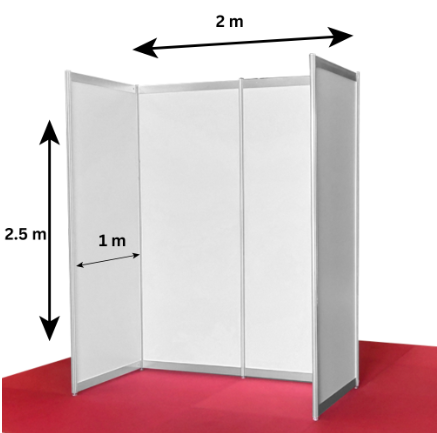
At the World Finals
Your own booth to showcase your project
If you come to the Infomatrix World Finals, you will be given a booth like this one, where you can showcase your project to the public, visiting schools, sponsors, and other participants.
- A dedicated exhibition booth to display your posters, prototype, and demo for everyone at the venue.
- Separately, you and your team will be taken to the jury judging rooms for your official presentation and evaluation.
registration_status: open
Ready to enter Software Development?
Registration for Season 2027 is open until 15 March.
Open the registration portal